", "datePublished": "2025-05-19T15:17:23Z", "@type": "Comment", "author": {"url": "https://www.v2ex.com/member/Naqin", "@type": "Person", "name": "Naqin"}}, {"text": "试用了下,挺好的,不知道后期会不会像 pdf expert 一样,吃内存", "datePublished": "2025-05-19T15:51:08Z", "@type": "Comment", "author": {"url": "https://www.v2ex.com/member/adob51", "@type": "Person", "name": "adob51"}}, {"text": "支持 synctex 吗?", "datePublished": "2025-05-19T22:18:03Z", "@type": "Comment", "author": {"url": "https://www.v2ex.com/member/Pangdouya", "@type": "Person", "name": "Pangdouya"}}, {"text": "好评已支持。 同一个文件 chrome 打开是清晰的,Rainbow PDF 打开时模糊的\nhttps://i.imgur.com/H4fdQeT.png", "datePublished": "2025-05-20T01:07:58Z", "@type": "Comment", "author": {"url": "https://www.v2ex.com/member/yangtianming", "@type": "Person", "name": "yangtianming"}}, {"text": "右侧是 chrome", "datePublished": "2025-05-20T01:08:27Z", "@type": "Comment", "author": {"url": "https://www.v2ex.com/member/yangtianming", "@type": "Person", "name": "yangtianming"}}, {"text": "@yangtianming #38 右侧是 chrome", "datePublished": "2025-05-20T01:08:47Z", "@type": "Comment", "author": {"url": "https://www.v2ex.com/member/yangtianming", "@type": "Person", "name": "yangtianming"}}, {"text": "@SayHelloHi 可能会增加,我还在考虑是往 PDF 编辑方向还是 PDF 批注笔记学术功能方向靠", "datePublished": "2025-05-20T01:16:25Z", "@type": "Comment", "author": {"url": "https://www.v2ex.com/member/zongmumask666", "@type": "Person", "name": "zongmumask666"}}, {"text": "@yangtianming 感谢反馈,我会在下个版本优化渲染效果", "datePublished": "2025-05-20T01:17:28Z", "@type": "Comment", "author": {"url": "https://www.v2ex.com/member/zongmumask666", "@type": "Person", "name": "zongmumask666"}}, {"text": "@adob51 +1 目前也在使用 pdf expert 已苦久已", "datePublished": "2025-05-20T01:17:42Z", "@type": "Comment", "author": {"url": "https://www.v2ex.com/member/foufoufm", "@type": "Person", "name": "foufoufm"}}, {"text": "@folnet 抱歉 deeplink 是什么功能", "datePublished": "2025-05-20T01:18:41Z", "@type": "Comment", "author": {"url": "https://www.v2ex.com/member/zongmumask666", "@type": "Person", "name": "zongmumask666"}}, {"text": "@zongmumask666 可能是我的电脑比较老,pdf 上下滚动的时候,渲染时字会模糊一下,然后再变的清晰,pdf expert 就基本没有这个情况", "datePublished": "2025-05-20T01:20:23Z", "@type": "Comment", "author": {"url": "https://www.v2ex.com/member/byby", "@type": "Person", "name": "byby"}}, {"text": "在阅读页中,点击底部页码左边的左边按钮(看起来是前往顶部)是跳到最底部,点击底部页码右边的右边按钮(看起来是前往底部)是跳到最顶部", "datePublished": "2025-05-20T01:31:17Z", "@type": "Comment", "author": {"url": "https://www.v2ex.com/member/CpchengToken", "@type": "Person", "name": "CpchengToken"}}, {"text": "@byby 因为有两个图层 一个用来预览整个页面 一个渲染的高清分块。我调研了下 pdf expert 应该也是这种方案,也会由模糊变清晰,这种方案可以实现快速滚动缩放", "datePublished": "2025-05-20T01:38:19Z", "@type": "Comment", "author": {"url": "https://www.v2ex.com/member/zongmumask666", "@type": "Person", "name": "zongmumask666"}}, {"text": "@CpchengToken 好的 会在下个版本修复", "datePublished": "2025-05-20T01:38:57Z", "@type": "Comment", "author": {"url": "https://www.v2ex.com/member/zongmumask666", "@type": "Person", "name": "zongmumask666"}}, {"text": "@Naqin 感谢反馈 我会在下个版本优化渲染效果", "datePublished": "2025-05-20T01:41:31Z", "@type": "Comment", "author": {"url": "https://www.v2ex.com/member/zongmumask666", "@type": "Person", "name": "zongmumask666"}}, {"text": "https://i.imgur.com/1m3zgqH.png\n@zongmumask666 非常好用. 顺便请教一下, 你这个 hover 的 tooltip 使用的是什么开源的组件吗 ? 感觉效果很好.", "datePublished": "2025-05-20T02:39:14Z", "@type": "Comment", "author": {"url": "https://www.v2ex.com/member/ivyliner", "@type": "Person", "name": "ivyliner"}}, {"text": "@ivyliner https://github.com/sbooth/SFBPopovers", "datePublished": "2025-05-20T02:46:00Z", "@type": "Comment", "author": {"url": "https://www.v2ex.com/member/zongmumask666", "@type": "Person", "name": "zongmumask666"}}, {"text": "@foufoufm 是的,苦 PDF Expert 久矣,无奈用回 preview 和 skim ,都没 PDF expert 用着顺手。就是吃内存太严重", "datePublished": "2025-05-20T03:50:24Z", "@type": "Comment", "author": {"url": "https://www.v2ex.com/member/adob51", "@type": "Person", "name": "adob51"}}, {"text": "@adob51 开的时间久了,新版 m4pro 都会发烫", "datePublished": "2025-05-20T04:28:31Z", "@type": "Comment", "author": {"url": "https://www.v2ex.com/member/foufoufm", "@type": "Person", "name": "foufoufm"}}, {"text": "@adob51 你主要用 pdf expert 什么功能呢 编辑相关的吗 还是笔记", "datePublished": "2025-05-20T04:31:07Z", "@type": "Comment", "author": {"url": "https://www.v2ex.com/member/zongmumask666", "@type": "Person", "name": "zongmumask666"}}, {"text": "@foufoufm 感谢反馈 这个优化起来有难度😂", "datePublished": "2025-05-20T04:32:08Z", "@type": "Comment", "author": {"url": "https://www.v2ex.com/member/zongmumask666", "@type": "Person", "name": "zongmumask666"}}, {"text": "希望支持多 tab", "datePublished": "2025-05-20T04:42:27Z", "@type": "Comment", "author": {"url": "https://www.v2ex.com/member/laike9m", "@type": "Person", "name": "laike9m"}}, {"text": "可以增加快捷键支持提高效率,尤其是高亮、下划线等等。\n可以增加对 6 个默认固定颜色的自定义\nTabs 栏有点窄,显得很小气(个人感受)", "datePublished": "2025-05-20T04:45:07Z", "@type": "Comment", "author": {"url": "https://www.v2ex.com/member/hlin3", "@type": "Person", "name": "hlin3"}}, {"text": "好奇想了解下 技术选型为什么用 pdfium 没有用 pdf.js 之类的 也可能实现跨平台?", "datePublished": "2025-05-20T05:28:12Z", "@type": "Comment", "author": {"url": "https://www.v2ex.com/member/nexo", "@type": "Person", "name": "nexo"}}, {"text": "有改页面背景色的功能吗?一般阅读时,纯白太刺眼。\n不要 PDF Expert 那种 Sepia (那个连文字颜色也会改)。只改背景色就行。", "datePublished": "2025-05-20T05:57:10Z", "@type": "Comment", "author": {"url": "https://www.v2ex.com/member/shimanooo", "@type": "Person", "name": "shimanooo"}}, {"text": "@laike9m 现在是支持多 Tab 的呢", "interactionStatistic": {"userInteractionCount": 1, "@type": "InteractionCounter", "interactionType": "https://schema.org/LikeAction"}, "datePublished": "2025-05-20T06:08:37Z", "@type": "Comment", "author": {"url": "https://www.v2ex.com/member/zongmumask666", "@type": "Person", "name": "zongmumask666"}}, {"text": "@hsulin 感谢反馈 后面会增加快捷键", "datePublished": "2025-05-20T06:09:36Z", "@type": "Comment", "author": {"url": "https://www.v2ex.com/member/zongmumask666", "@type": "Person", "name": "zongmumask666"}}, {"text": "@nexo pdfium 使用 c++, 基于性能选择了 pdfium ,体验会更好", "datePublished": "2025-05-20T06:10:44Z", "@type": "Comment", "author": {"url": "https://www.v2ex.com/member/zongmumask666", "@type": "Person", "name": "zongmumask666"}}, {"text": "@shimanooo 感谢 后面会增加夜间模式 固定黑底白字 太灵活了不太好交互", "datePublished": "2025-05-20T06:14:14Z", "@type": "Comment", "author": {"url": "https://www.v2ex.com/member/zongmumask666", "@type": "Person", "name": "zongmumask666"}}, {"text": "@shimanooo 加一。这个我也是刚需", "datePublished": "2025-05-20T06:19:51Z", "@type": "Comment", "author": {"url": "https://www.v2ex.com/member/jchnxu", "@type": "Person", "name": "jchnxu"}}, {"text": "@zongmumask666 https://hookproductivity.com/help/more/deep-pdf-links/ 复制出来的文字链接可以定位回 pdf 具体的文字位置", "datePublished": "2025-05-20T06:23:05Z", "@type": "Comment", "author": {"url": "https://www.v2ex.com/member/folnet", "@type": "Person", "name": "folnet"}}, {"text": "如果你有对这款 PDF 阅读器的建议或反馈,欢迎加我微信交流 🙌\n我是独立开发者,目前也在收集大家的使用感受,后续的更新也会在群里第一时间通知。\n欢迎扫码进群 👇\n", "datePublished": "2025-05-20T06:38:47Z", "@type": "Comment", "author": {"url": "https://www.v2ex.com/member/zongmumask666", "@type": "Person", "name": "zongmumask666"}}, {"text": "我喜欢按空格预览,能替换吗😁", "datePublished": "2025-05-20T08:24:01Z", "@type": "Comment", "author": {"url": "https://www.v2ex.com/member/bowencool", "@type": "Person", "name": "bowencool"}}, {"text": "已支持, 在 macos 上,看起来是糊的,\n选中注释,点击复制,crash 了。 有 android 计划的话, 愿意加入成为 Android 开发之一。哈哈", "datePublished": "2025-05-20T19:55:41Z", "@type": "Comment", "author": {"url": "https://www.v2ex.com/member/lincleejun", "@type": "Person", "name": "lincleejun"}}, {"text": "吃内存吗?", "datePublished": "2025-05-21T01:03:20Z", "@type": "Comment", "author": {"url": "https://www.v2ex.com/member/NafIyIz", "@type": "Person", "name": "NafIyIz"}}, {"text": "@Naqin 1.1.8 已发布,麻烦看看还有渲染模糊的问题吗", "datePublished": "2025-05-21T02:09:04Z", "@type": "Comment", "author": {"url": "https://www.v2ex.com/member/zongmumask666", "@type": "Person", "name": "zongmumask666"}}, {"text": "@yangtianming 1.1.8 已发布,麻烦看看还有渲染模糊的问题吗", "datePublished": "2025-05-21T02:09:30Z", "@type": "Comment", "author": {"url": "https://www.v2ex.com/member/zongmumask666", "@type": "Person", "name": "zongmumask666"}}, {"text": "@zongmumask666 感觉还是有一些发白的感觉。\nhttps://i.imgur.com/VqFjkkk.png", "datePublished": "2025-05-21T03:55:20Z", "@type": "Comment", "author": {"url": "https://www.v2ex.com/member/Naqin", "@type": "Person", "name": "Naqin"}}, {"text": "之前下了一个老外做的 pdf ,它可以把白色的背景渲染成黑色的。字体内容都变成渲染成其他颜色。挺护眼的", "datePublished": "2025-05-21T04:51:00Z", "@type": "Comment", "author": {"url": "https://www.v2ex.com/member/sndbsn", "@type": "Person", "name": "sndbsn"}}, {"text": "@Naqin 看起来 应该是高清 没有模糊了", "datePublished": "2025-05-21T06:07:53Z", "@type": "Comment", "author": {"url": "https://www.v2ex.com/member/zongmumask666", "@type": "Person", "name": "zongmumask666"}}, {"text": "@sndbsn 后续版本会加入该功能", "datePublished": "2025-05-21T06:08:49Z", "@type": "Comment", "author": {"url": "https://www.v2ex.com/member/zongmumask666", "@type": "Person", "name": "zongmumask666"}}, {"text": "期待页面编辑、组织功能,可以参考 UPDF ,再加上 word 与 pdf 的转换就更好了,楼主加油,好用爱用! https://i.imgur.com/pmNOo2w.png", "datePublished": "2025-05-21T06:37:25Z", "@type": "Comment", "author": {"url": "https://www.v2ex.com/member/Bssn", "@type": "Person", "name": "Bssn"}}, {"text": "使用中,不知道能不能出一个双页视图的功能,个人感觉屏幕比例显示两页 pdf 视图更舒服。\n另外在缩放视图下,点击第一页和最后一页按钮,pdf 文件会靠左对齐,而不是保持居中,单机下一页又会回到居中对齐,不知道能不能修复下。", "datePublished": "2025-05-21T06:43:45Z", "@type": "Comment", "author": {"url": "https://www.v2ex.com/member/synia", "@type": "Person", "name": "synia"}}, {"text": "希望增加键盘翻页的功能,pageUp, pageDown, 空格,Left, Right, Cmd+Up, Cmd+Down", "datePublished": "2025-05-21T06:56:27Z", "@type": "Comment", "author": {"url": "https://www.v2ex.com/member/zouyang08", "@type": "Person", "name": "zouyang08"}}, {"text": "@zongmumask666 是的,就是对比度没有 skim 那么大感觉,希望文字更黑一些😁。然后 OP 考不考虑文献自动解析之类的功能呢?", "datePublished": "2025-05-21T07:15:36Z", "@type": "Comment", "author": {"url": "https://www.v2ex.com/member/Naqin", "@type": "Person", "name": "Naqin"}}, {"text": "@Naqin 文献自动解析是什么功能 AI 吗", "datePublished": "2025-05-21T09:41:30Z", "@type": "Comment", "author": {"url": "https://www.v2ex.com/member/zongmumask666", "@type": "Person", "name": "zongmumask666"}}, {"text": "@zouyang08 感谢反馈 会在下个版本增加快捷键", "datePublished": "2025-05-21T09:42:00Z", "@type": "Comment", "author": {"url": "https://www.v2ex.com/member/zongmumask666", "@type": "Person", "name": "zongmumask666"}}, {"text": "@synia 感谢反馈 会在下个版本中修复 bug ,双页视图也会增加🙏", "datePublished": "2025-05-21T09:43:31Z", "@type": "Comment", "author": {"url": "https://www.v2ex.com/member/zongmumask666", "@type": "Person", "name": "zongmumask666"}}, {"text": "@Bssn 感谢反馈 页面编辑的功能正在开发 大概几个月后上😂", "datePublished": "2025-05-21T09:45:06Z", "@type": "Comment", "author": {"url": "https://www.v2ex.com/member/zongmumask666", "@type": "Person", "name": "zongmumask666"}}, {"text": "界面简洁美观,已 5 星支持。就是稳定性还不太好,遇到好几次崩溃或者打开文件没反应", "datePublished": "2025-05-21T13:27:42Z", "@type": "Comment", "author": {"url": "https://www.v2ex.com/member/ruib", "@type": "Person", "name": "ruib"}}, {"text": "@ruib 感谢反馈🙌", "datePublished": "2025-05-21T13:58:03Z", "@type": "Comment", "author": {"url": "https://www.v2ex.com/member/zongmumask666", "@type": "Person", "name": "zongmumask666"}}, {"text": "支持 ODF 转 PDF 吗?", "datePublished": "2025-05-21T15:22:33Z", "@type": "Comment", "author": {"url": "https://www.v2ex.com/member/nirnovo", "@type": "Person", "name": "nirnovo"}}, {"text": "感谢作者开发的软件,耳目一新😄\n有两个意见供您参考:\n1. 可不可一将界面再简化一点,比如可以隐藏侧边栏,相信有很多朋友也喜欢将阅读空间最大化。\n2. 能不能增加一个 page expose 的 overview 功能。这个功能可能是从大文件中快速选中某页的最佳方案。\n感谢作者。", "datePublished": "2025-05-22T02:30:25Z", "@type": "Comment", "author": {"url": "https://www.v2ex.com/member/caobo86", "@type": "Person", "name": "caobo86"}}, {"text": "两边都有工具栏太占空间了,希望能安排到同一边", "datePublished": "2025-05-22T03:35:16Z", "@type": "Comment", "author": {"url": "https://www.v2ex.com/member/Kasine", "@type": "Person", "name": "Kasine"}}, {"text": "PDF Expert 的文本编辑功能能实现么?", "datePublished": "2025-05-22T05:40:30Z", "@type": "Comment", "author": {"url": "https://www.v2ex.com/member/ggmood", "@type": "Person", "name": "ggmood"}}, {"text": "@caobo86 好的 感谢反馈。 你说的 page expose 是 pdf expert 中缩略图一样的页面吗", "datePublished": "2025-05-22T06:27:22Z", "@type": "Comment", "author": {"url": "https://www.v2ex.com/member/zongmumask666", "@type": "Person", "name": "zongmumask666"}}, {"text": "@ggmood 正在开发,后续会支持对已有文本 图片的编辑和增加新的文本图片,争取今年能开发完", "datePublished": "2025-05-22T06:28:45Z", "@type": "Comment", "author": {"url": "https://www.v2ex.com/member/zongmumask666", "@type": "Person", "name": "zongmumask666"}}, {"text": "可否支持打开文件夹,或者一次打开多份文件。之前为了这个功能一直用 ClearView X ,但它也有一些不够完善的地方\nhttps://xclient.info/s/clearview-x.html", "datePublished": "2025-05-24T18:40:53Z", "@type": "Comment", "author": {"url": "https://www.v2ex.com/member/laike9m", "@type": "Person", "name": "laike9m"}}, {"text": "提个建议,表格提取功能可否做个选项关闭,在一些非表格页面也会触发:\nhttps://imgur.com/a/6bBiJIf", "datePublished": "2025-05-28T07:19:36Z", "@type": "Comment", "author": {"url": "https://www.v2ex.com/member/ruib", "@type": "Person", "name": "ruib"}}, {"text": "@ruib 感谢反馈 后续加个开关", "datePublished": "2025-05-28T09:16:00Z", "@type": "Comment", "author": {"url": "https://www.v2ex.com/member/zongmumask666", "@type": "Person", "name": "zongmumask666"}}], "interactionStatistic": [{"userInteractionCount": 7503, "@type": "InteractionCounter", "interactionType": "https://schema.org/ViewAction"}, {"userInteractionCount": 46, "@type": "InteractionCounter", "interactionType": "https://schema.org/LikeAction"}, {"userInteractionCount": 94, "@type": "InteractionCounter", "interactionType": "https://schema.org/ReplyAction"}], "text": "我是一个独立开发者,最近上线了一款 macOS 上的 PDF 阅读器,最初是因为自己处理 PDF 时总觉得不够顺手,就想着自己做一个,功能更聚焦、体验更清爽一点。\n开发过程中我选择了 PDFium 作为渲染引擎,主要是为了未来的跨平台计划(包括 Windows 和 Android ),这样可以最大限度复用底层代码,降低维护成本。同时在 macOS 上用 Swift 实现了 UI 部分,整体开发体验也不错。\n这款阅读器目前支持:\n表格提取:从可编辑的 PDF 中提取结构化表格,粘贴到 Excel 时能保持格式,对看财报、数据分析挺方便的\n注释工具:荧光笔、下划线、文本框、手写等标注方式,适合做文档批注和读书笔记\n未来我会继续更新,逐步加入编辑功能,比如修改文字、插入段落、重新排版等。也计划提供同步和多平台版本,打造一个价格亲民但实用的 PDF 工具,适合个人和小团队使用。\n开发过程中也遇到了不少挑战,要深入理解 PDF 文件结构,研究 PDFium 的源码实现,才能实现稳定而准确的表格提取算法。像表格单元格的定位、线框判断、内容顺序识别等,都需要结合文本、图形和布局信息进行分析。这部分是整个项目中最耗时、但也最有价值的部分。\n现在 App 已经上线,欢迎 mac 用户试用,也欢迎交流开发经验、踩坑记录、或产品反馈~\nApp Store:\nRainbow PDF", "image": ["https://p.ipic.vip/hcplyh.png", "https://p.ipic.vip/mlt7y7.png", "https://p.ipic.vip/ragcup.png"], "datePublished": "2025-05-19T06:53:26Z", "commentCount": 94, "mainEntityOfPage": "https://www.v2ex.com/t/1132773", "author": {"url": "https://www.v2ex.com/member/zongmumask666", "@type": "Person", "name": "zongmumask666"}, "headline": "我开发了一款 PDF 阅读器(基于 PDFium + Swift ,免费)", "@type": "DiscussionForumPosting", "url": "https://www.v2ex.com/t/1132773", "isPartOf": {"url": "https://www.v2ex.com/go/idev", "@type": "WebPage", "name": "iDev"}, "@context": "https://schema.org", "dateModified": "2025-05-19T07:01:54Z"}
我是一个独立开发者,最近上线了一款 macOS 上的 PDF 阅读器,最初是因为自己处理 PDF 时总觉得不够顺手,就想着自己做一个,功能更聚焦、体验更清爽一点。
开发过程中我选择了 PDFium 作为渲染引擎,主要是为了未来的跨平台计划(包括 Windows 和 Android ),这样可以最大限度复用底层代码,降低维护成本。同时在 macOS 上用 Swift 实现了 UI 部分,整体开发体验也不错。
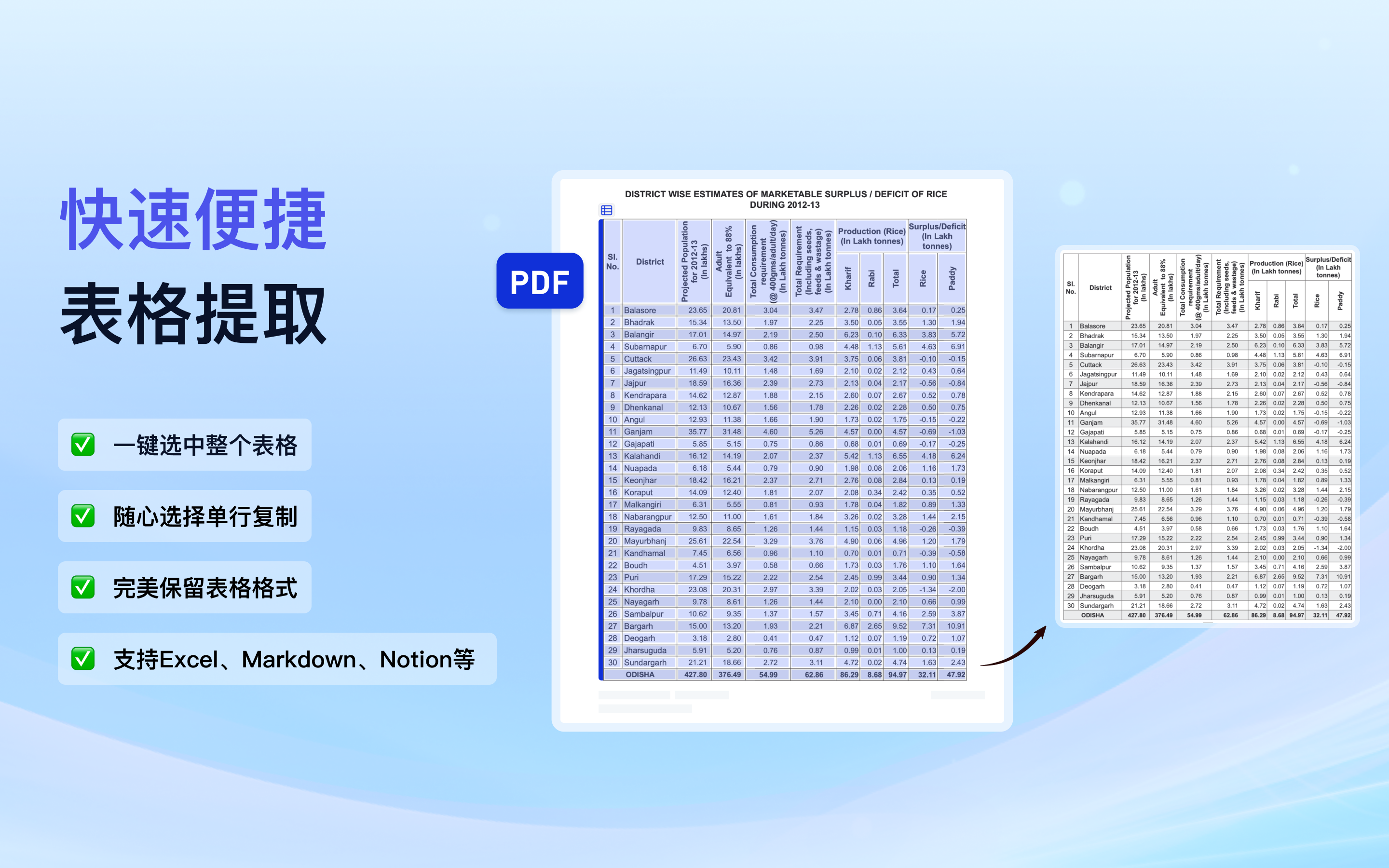
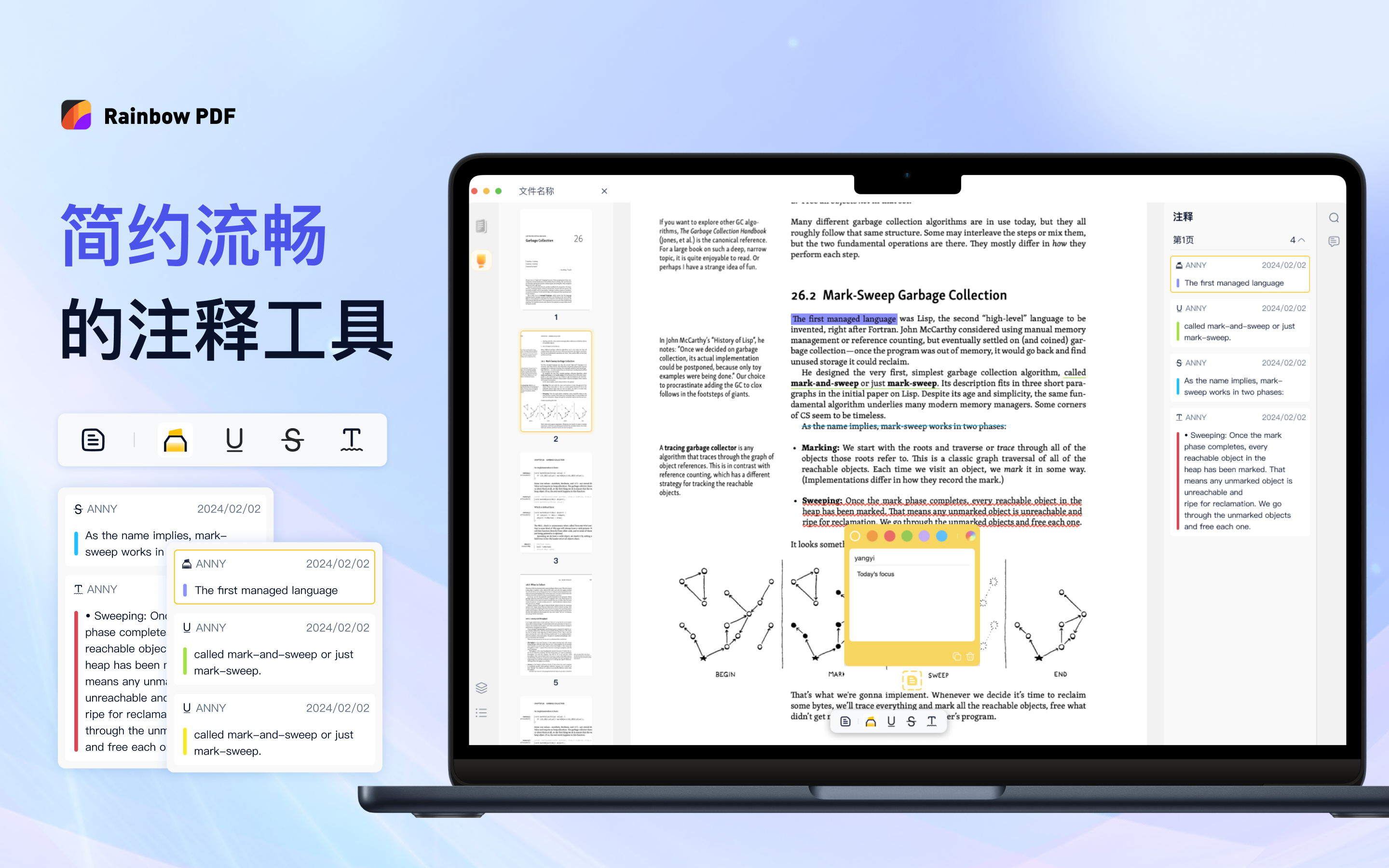
这款阅读器目前支持:
未来我会继续更新,逐步加入编辑功能,比如修改文字、插入段落、重新排版等。也计划提供同步和多平台版本,打造一个价格亲民但实用的 PDF 工具,适合个人和小团队使用。
开发过程中也遇到了不少挑战,要深入理解 PDF 文件结构,研究 PDFium 的源码实现,才能实现稳定而准确的表格提取算法。像表格单元格的定位、线框判断、内容顺序识别等,都需要结合文本、图形和布局信息进行分析。这部分是整个项目中最耗时、但也最有价值的部分。
现在 App 已经上线,欢迎 mac 用户试用,也欢迎交流开发经验、踩坑记录、或产品反馈~
App Store: Rainbow PDF
如果你有对这款 PDF 阅读器的建议或反馈,欢迎加我微信交流 🙌 目前也在收集大家的使用感受,后续的更新也会在群里第一时间通知。
欢迎扫码进群 👇

1
longline 2025 年 5 月 19 日
首评,试用下
|
2
vfs 2025 年 5 月 19 日
看起来是一个很大的项目,加油。
|
3
cns 2025 年 5 月 19 日
|
4
intoext 2025 年 5 月 19 日
支持! 已经用上了,就喜欢小而美的 APP
|
5
zongmumask666 OP @longline 可以的话 App Store 给个好评吧 感谢
|
6
zongmumask666 OP @intoext 可以给个好评哦 感谢
|
7
adaashili 2025 年 5 月 19 日
请问未来是否会推出付费方案或订阅模式?想了解下后续的价格策略和收费模式
|
8
freefcw 2025 年 5 月 19 日
必须来支持一个
|
9
hexo 2025 年 5 月 19 日
已安装,缩放比例如何选择成 100%
|
10
fyex 2025 年 5 月 19 日
好用🤙
|
11
gy0624ww 2025 年 5 月 19 日
那个 翻到开头和翻到尾部 是不是写反了?很反人类啊
|
12
gy0624ww 2025 年 5 月 19 日
而且如何快速调整缩放比,不能直接修改比例吗
|
13
luokevin 2025 年 5 月 19 日
太牛了哥
|
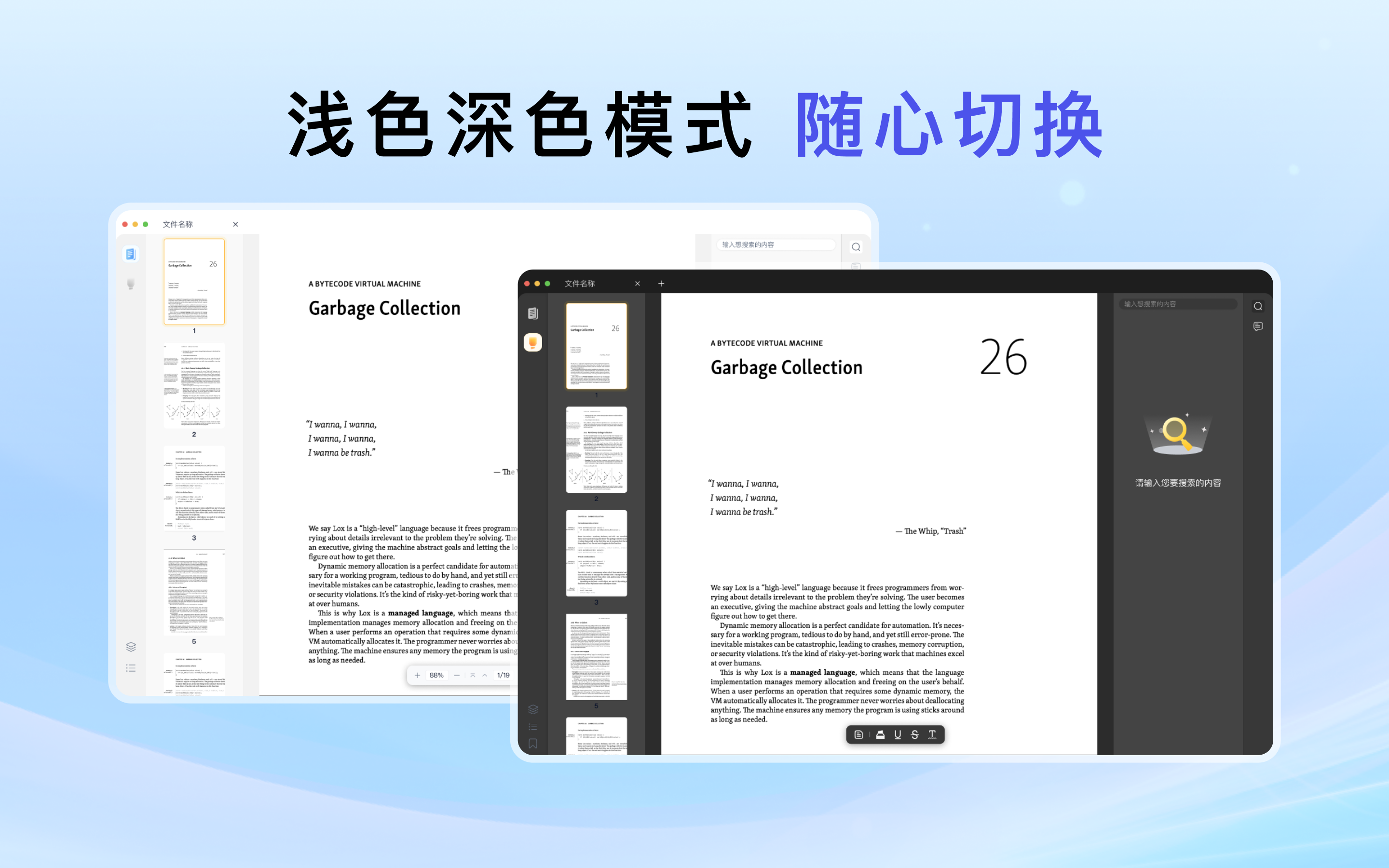
14
chutianyao 2025 年 5 月 19 日
有没有 dmg 下载,不想用 app store
|
15
WontonLee 2025 年 5 月 19 日
已下載支持!不過不知道為什麼在我的 2k 顯示器上面渲染有些問題。
![]() 而且從“最近打開”欄目中打開文件有可能會崩潰。不過個人還是比較喜歡像 Skim 的閱讀器( Skim 的問題在於註解和文件是分開保存的,所以自己也不常用 Skim ,但是它的夜間模式我覺得比較好,白色的文件可以給你反色顯示),就沒有這樣一個 hub ,有些文件我只想預覽不是很希望能夠在最近打開中出現,總的來說這個瀏覽器一樣的 hub 對我而言有些多餘。再者,希望可以提供最近打開中能夠清除單個瀏覽過的文件的選項,而不是只能全部清空。 閱覽文件時我發現沒辦法用 Look-up 呼出詞典,不知道這個功能大家常不常用,但是對我來說 Mac 上的這個功能很重要。 |
16
byby 2025 年 5 月 19 日 via iPhone
有点卡
|
17
zongmumask666 OP @adaashili 我选的跨平台的 pdfium ,后续会做 Windows 和 Android 平台,正在开发 iPad 和 PDF 编辑的功能,编辑功能会需要订阅,拼夕夕版本的 PDF Expert
|
18
zongmumask666 OP @hexo 可以触控板缩放和鼠标滚轮缩放哈,后续应该会加个显示模式按真是大小显示
|
19
hellopz 2025 年 5 月 19 日
试用了一下,相当优雅,真小而美
|
20
zongmumask666 OP @gy0624ww 感谢反馈,试了下 好像真的反了,下个版本修复😂
|
21
zongmumask666 OP @gy0624ww 支持触控板手势缩放和 cmd+鼠标滚轮缩放哈
|
22
zongmumask666 OP @chutianyao 目前只有 App Store 哈
|
23
zongmumask666 OP @WontonLee 感谢反馈,是渲染不够清晰吗,方便把样例 PDF 发一份到我的邮箱吗 [email protected] 。感谢您的反馈,我会在后续版本增加白底黑字夜间阅读模式和呼出词典,也许下下个版本。
|
24
zongmumask666 OP @byby 感谢您的反馈,是滚动卡还是缩放卡呢,方便发一下你的 PDF 文件到 [email protected] 吗
|
25
WontonLee 2025 年 5 月 19 日
@zongmumask666 #23 是的,如圖感覺分辨率有點問題,但是 UI 是好的。不論哪個 PDF 都是這樣顯示的。圖片中的 PDF 是這個: https://github.com/georgd/EB-Garamond/blob/d04d0f9da5adad27ff0e5947807b80cfe13dc477/specimen/Specimen.pdf 。
|
26
xlouis 2025 年 5 月 19 日
怎么没有"打印"菜单
|
27
zongmumask666 OP @ltxlouis 感谢反馈 后续会加上
|
28
zongmumask666 OP @WontonLee 感谢,我没有 2k 显示器,只有在模拟器上试试了,方便留个联系方式到我的邮箱吗,我想修改了麻烦帮我在你的显示器上验证一下😂
|
29
SayHelloHi 2025 年 5 月 19 日
|
30
folnet 2025 年 5 月 19 日
支持一个, 后续能支持 deeplink 吗
|
31
linyuyizhizou 2025 年 5 月 19 日
@SayHelloHi 这本书有翻译好的版本。《深入设计模式》
|
32
river010 2025 年 5 月 19 日
已试用,非常清爽。建议增加三个功能:
1. 双页; 2. 适应页面; 3. 页面排序从右向左(参考 skim ) |
33
kenniewwwww 2025 年 5 月 19 日
对,试了下 2k 显示器上看是糊的
|
34
WontonLee 2025 年 5 月 19 日
@zongmumask666 #28 好的沒問題,郵件已經發送了。不過剛才再嘗試了一下,發現如果不用觸控板縮放,而是按 + - 調整之後顯示會變清楚。但是打開任意文件還是會有機率是模糊的。
|
35
Naqin 2025 年 5 月 19 日
已试用,界面很喜欢,标注功能也方便。
但是感觉渲染有一些问题~感觉有些模糊(与 skim 进行对比的)。 配置单: Mac mini M4 + redmi A27u (4k) <blockquote class="imgur-embed-pub" lang="en" data-id="a/lGylodc" ><a href="//imgur.com/a/lGylodc">skim vs rinbowpdf</a></blockquote><script async src="//s.imgur.com/min/embed.js" charset="utf-8"></script> |
36
adob51 2025 年 5 月 19 日
试用了下,挺好的,不知道后期会不会像 pdf expert 一样,吃内存
|
37
Pangdouya 2025 年 5 月 20 日
支持 synctex 吗?
|
38
yangtianming 2025 年 5 月 20 日
|
39
yangtianming 2025 年 5 月 20 日
右侧是 chrome
|
40
yangtianming 2025 年 5 月 20 日
@yangtianming #38 右侧是 chrome
|
41
zongmumask666 OP @SayHelloHi 可能会增加,我还在考虑是往 PDF 编辑方向还是 PDF 批注笔记学术功能方向靠
|
42
zongmumask666 OP @yangtianming 感谢反馈,我会在下个版本优化渲染效果
|
44
zongmumask666 OP @folnet 抱歉 deeplink 是什么功能
|
45
byby 2025 年 5 月 20 日
@zongmumask666 可能是我的电脑比较老,pdf 上下滚动的时候,渲染时字会模糊一下,然后再变的清晰,pdf expert 就基本没有这个情况
|
46
CpchengToken 2025 年 5 月 20 日
在阅读页中,点击底部页码左边的左边按钮(看起来是前往顶部)是跳到最底部,点击底部页码右边的右边按钮(看起来是前往底部)是跳到最顶部
|
47
zongmumask666 OP @byby 因为有两个图层 一个用来预览整个页面 一个渲染的高清分块。我调研了下 pdf expert 应该也是这种方案,也会由模糊变清晰,这种方案可以实现快速滚动缩放
|
48
zongmumask666 OP @CpchengToken 好的 会在下个版本修复
|
49
zongmumask666 OP @Naqin 感谢反馈 我会在下个版本优化渲染效果
|
50
ivyliner 2025 年 5 月 20 日
|
51
zongmumask666 OP |
52
adob51 2025 年 5 月 20 日
@foufoufm 是的,苦 PDF Expert 久矣,无奈用回 preview 和 skim ,都没 PDF expert 用着顺手。就是吃内存太严重
|
54
zongmumask666 OP @adob51 你主要用 pdf expert 什么功能呢 编辑相关的吗 还是笔记
|
55
zongmumask666 OP @foufoufm 感谢反馈 这个优化起来有难度😂
|
56
laike9m 2025 年 5 月 20 日
希望支持多 tab
|
57
hlin3 2025 年 5 月 20 日
可以增加快捷键支持提高效率,尤其是高亮、下划线等等。
可以增加对 6 个默认固定颜色的自定义 Tabs 栏有点窄,显得很小气(个人感受) |
58
nexo 2025 年 5 月 20 日
好奇想了解下 技术选型为什么用 pdfium 没有用 pdf.js 之类的 也可能实现跨平台?
|
59
shimanooo 2025 年 5 月 20 日
有改页面背景色的功能吗?一般阅读时,纯白太刺眼。
不要 PDF Expert 那种 Sepia (那个连文字颜色也会改)。只改背景色就行。 |
60
zongmumask666 OP @laike9m 现在是支持多 Tab 的呢
|
61
zongmumask666 OP @hsulin 感谢反馈 后面会增加快捷键
|
62
zongmumask666 OP @nexo pdfium 使用 c++, 基于性能选择了 pdfium ,体验会更好
|
63
zongmumask666 OP @shimanooo 感谢 后面会增加夜间模式 固定黑底白字 太灵活了不太好交互
|
65
folnet 2025 年 5 月 20 日
@zongmumask666 https://hookproductivity.com/help/more/deep-pdf-links/ 复制出来的文字链接可以定位回 pdf 具体的文字位置
|
66
zongmumask666 OP 如果你有对这款 PDF 阅读器的建议或反馈,欢迎加我微信交流 🙌
我是独立开发者,目前也在收集大家的使用感受,后续的更新也会在群里第一时间通知。 欢迎扫码进群 👇  |
67
bowencool 2025 年 5 月 20 日
我喜欢按空格预览,能替换吗😁
|
68
lincleejun 2025 年 5 月 21 日
已支持, 在 macos 上,看起来是糊的,
选中注释,点击复制,crash 了。 有 android 计划的话, 愿意加入成为 Android 开发之一。哈哈 |
69
NafIyIz 2025 年 5 月 21 日
吃内存吗?
|
70
zongmumask666 OP @Naqin 1.1.8 已发布,麻烦看看还有渲染模糊的问题吗
|
71
zongmumask666 OP @yangtianming 1.1.8 已发布,麻烦看看还有渲染模糊的问题吗
|
72
Naqin 2025 年 5 月 21 日
|
73
sndbsn 2025 年 5 月 21 日
之前下了一个老外做的 pdf ,它可以把白色的背景渲染成黑色的。字体内容都变成渲染成其他颜色。挺护眼的
|
74
zongmumask666 OP @Naqin 看起来 应该是高清 没有模糊了
|
75
zongmumask666 OP @sndbsn 后续版本会加入该功能
|
76
Bssn 2025 年 5 月 21 日
|
77
synia 2025 年 5 月 21 日
使用中,不知道能不能出一个双页视图的功能,个人感觉屏幕比例显示两页 pdf 视图更舒服。
另外在缩放视图下,点击第一页和最后一页按钮,pdf 文件会靠左对齐,而不是保持居中,单机下一页又会回到居中对齐,不知道能不能修复下。 |
78
zouyang08 2025 年 5 月 21 日
希望增加键盘翻页的功能,pageUp, pageDown, 空格,Left, Right, Cmd+Up, Cmd+Down
|
79
Naqin 2025 年 5 月 21 日
@zongmumask666 是的,就是对比度没有 skim 那么大感觉,希望文字更黑一些😁。然后 OP 考不考虑文献自动解析之类的功能呢?
|
80
zongmumask666 OP @Naqin 文献自动解析是什么功能 AI 吗
|
81
zongmumask666 OP @zouyang08 感谢反馈 会在下个版本增加快捷键
|
82
zongmumask666 OP @synia 感谢反馈 会在下个版本中修复 bug ,双页视图也会增加🙏
|
83
zongmumask666 OP @Bssn 感谢反馈 页面编辑的功能正在开发 大概几个月后上😂
|
84
ruib 2025 年 5 月 21 日
界面简洁美观,已 5 星支持。就是稳定性还不太好,遇到好几次崩溃或者打开文件没反应
|
85
zongmumask666 OP @ruib 感谢反馈🙌
|
86
nirnovo 2025 年 5 月 21 日
支持 ODF 转 PDF 吗?
|
87
caobo86 2025 年 5 月 22 日
感谢作者开发的软件,耳目一新😄
有两个意见供您参考: 1. 可不可一将界面再简化一点,比如可以隐藏侧边栏,相信有很多朋友也喜欢将阅读空间最大化。 2. 能不能增加一个 page expose 的 overview 功能。这个功能可能是从大文件中快速选中某页的最佳方案。 感谢作者。 |
88
Kasine 2025 年 5 月 22 日
两边都有工具栏太占空间了,希望能安排到同一边
|
89
ggmood 2025 年 5 月 22 日
PDF Expert 的文本编辑功能能实现么?
|
90
zongmumask666 OP @caobo86 好的 感谢反馈。 你说的 page expose 是 pdf expert 中缩略图一样的页面吗
|
91
zongmumask666 OP @ggmood 正在开发,后续会支持对已有文本 图片的编辑和增加新的文本图片,争取今年能开发完
|
92
laike9m 2025 年 5 月 25 日
|
93
ruib 2025 年 5 月 28 日
提个建议,表格提取功能可否做个选项关闭,在一些非表格页面也会触发:
https://imgur.com/a/6bBiJIf |
94
zongmumask666 OP @ruib 感谢反馈 后续加个开关
|
