\n3.使用矩阵中心点旋转缩放\nlet image = document.createElement(\"img\");\nlet context = canvas.getContext(\"2d\");\nimage.src = \"http://static.atvideo.cc/veleap/templateDemo/2021/04/06/16/30aawseyhgae.png\";\nimage.onload = function () {\nconst imageWidth = image.width,\nimageHeight = image.height,\ncenterPointX = imageWidth / 2,\ncenterPointY = imageHeight / 2;\nlet a = {\nx: centerPointX,\ny: centerPointY,\n},\np = {\nx: centerPointX,\ny: centerPointY,\n},\ns = {\nx: 0.5,\ny: 0.5,\n},\nr = 45;\nlet matrix = new Affine();\nmatrix.set(a, p, s, r);\ncontext.setTransform(matrix.mA, matrix.mB, matrix.mC, matrix.mD, matrix.mE, matrix.mF);\ncontext.drawImage(\nimage,\n0,\n0,\n);\n}", "image": ["https://img-blog.csdnimg.cn/20210407142120892.png?x-oss-process=image/watermark,type_ZmFuZ3poZW5naGVpdGk,shadow_10,text_aHR0cHM6Ly9ibG9nLmNzZG4ubmV0L3dlaXhpbl80MTE5MTczOQ==,size_16,color_FFFFFF,t_70", "https://img-blog.csdnimg.cn/20210407142338544.png?x-oss-process=image/watermark,type_ZmFuZ3poZW5naGVpdGk,shadow_10,text_aHR0cHM6Ly9ibG9nLmNzZG4ubmV0L3dlaXhpbl80MTE5MTczOQ==,size_16,color_FFFFFF,t_70"], "datePublished": "2021-04-07T06:43:27Z", "commentCount": 0, "mainEntityOfPage": "https://www.v2ex.com/t/768714", "author": {"url": "https://www.v2ex.com/member/zoule", "@type": "Person", "name": "zoule"}, "headline": "canvas 使用 Affine,实现任意点变换(旋转,位移,缩放", "@type": "DiscussionForumPosting", "url": "https://www.v2ex.com/t/768714", "isPartOf": {"url": "https://www.v2ex.com/go/webdev", "@type": "WebPage", "name": "Web Dev"}, "@context": "https://schema.org", "dateModified": "2022-03-05T19:03:59Z"}
V2EX = way to explore
V2EX 是一个关于分享和探索的地方
现在注册
已注册用户请  登录
zoule
V2EX  ›  Web Dev

canvas 使用 Affine,实现任意点变换(旋转,位移,缩放

  •  
  •   zoule · 2021 年 4 月 7 日 · 1787 次点击
    这是一个创建于 1833 天前的主题,其中的信息可能已经有所发展或是发生改变。

    矩阵入门教程及文件获取地址

    http://www.seeshiontech.com/docs/page_145.html

    1.首先我们创建 canvas 标签,为了方便查看效果,我们为 canvas 添加一下样式,这里图片我使用的是 1920*1080 的尺寸

    <canvas id="canvas" width="1920" height="1080"></canvas>
    
     canvas {
                display: block;
                border: 1px solid;
                width: 480px;
                height: 270px;
                margin: 100px auto;
            }
    
     //不做处理 将图片绘制到画布
     let image = document.createElement("img");
            let context = canvas.getContext("2d");
            image.src = "http://static.atvideo.cc/veleap/templateDemo/2021/04/06/16/30aawseyhgae.png";
            image.onload = function () {
                context.drawImage(
                    image,
                    0,
                    0,
                );
            }

    

    2.引入 Affine.js 文件

    <script src="./lib/Affine.js"></script>
    

    3.使用矩阵中心点旋转缩放

     let image = document.createElement("img");
            let context = canvas.getContext("2d");
            image.src = "http://static.atvideo.cc/veleap/templateDemo/2021/04/06/16/30aawseyhgae.png";
            image.onload = function () {
                const imageWidth = image.width,
                    imageHeight = image.height,
                    centerPointX = imageWidth / 2,
                    centerPointY = imageHeight / 2;
                let a = {
                    x: centerPointX,
                    y: centerPointY,
                },
                    p = {
                        x: centerPointX,
                        y: centerPointY,
                    },
                    s = {
                        x: 0.5,
                        y: 0.5,
                    },
                    r = 45;
    
                let matrix = new Affine();
                matrix.set(a, p, s, r);
                context.setTransform(matrix.mA, matrix.mB, matrix.mC, matrix.mD, matrix.mE, matrix.mF);
                context.drawImage(
                    image,
                    0,
                    0,
                );
            }
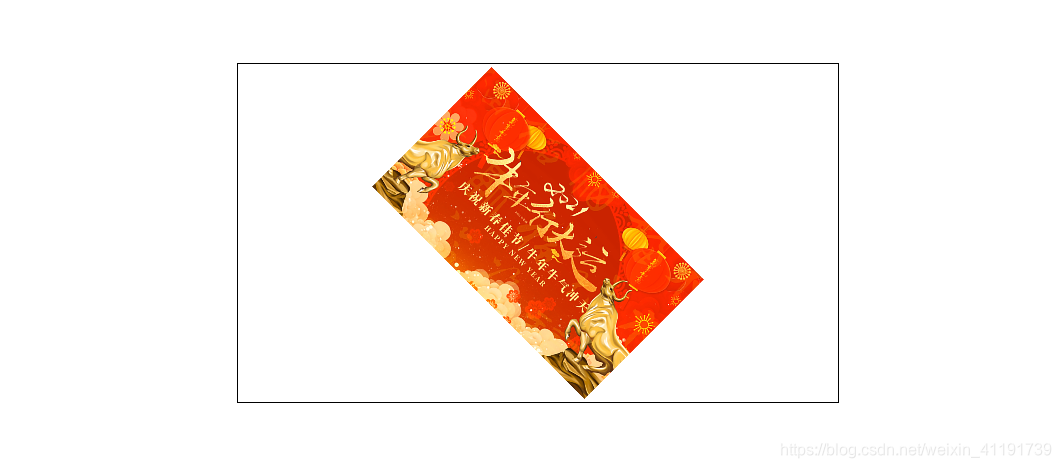
    

    在这里插入图片描述

    目前尚无回复
    关于   ·   帮助文档   ·   自助推广系统   ·   博客   ·   API   ·   FAQ   ·   Solana   ·   5634 人在线   最高记录 6679   ·     Select Language
    创意工作者们的社区
    World is powered by solitude
    VERSION: 3.9.8.5 · 40ms · UTC 03:30 · PVG 11:30 · LAX 20:30 · JFK 23:30
    ♥ Do have faith in what you're doing.